Milleniale Duo: A Playful Font Pair That Works—When You Use It Right
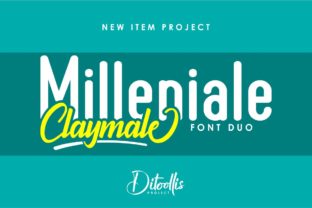
Milleniale Duo isn’t just another font bundle—it’s a thoughtfully crafted pairing of two distinct yet harmonious typefaces: Milleniale (a friendly, rounded sans serif) and Milleniale Script (a lively, hand-drawn script). Together, they offer contrast without conflict, personality without pretension, and versatility without compromise. Whether you’re designing a café menu, launching a boutique brand, or crafting social media graphics, this duo delivers instant charm—if used with intention.
Why People Reach for Milleniale Duo (and Why That’s Not Always Enough)
Designers and non-designers alike gravitate toward Milleniale Duo because it feels approachable and fresh. Its rounded forms soften digital edges, while the script adds warmth and human rhythm. That’s especially valuable for audiences who respond to authenticity—think small business owners connecting with local customers, educators making learning materials more inviting, or bloggers building a relatable visual voice.
But here’s what often gets overlooked: playfulness needs purpose. A fun font won’t fix weak hierarchy, inconsistent spacing, or mismatched tone. Using Milleniale Script for body text—or setting both fonts at the same weight and size—can undermine clarity instead of enhancing it. The duo shines when each font plays its role: one for structure, the other for emphasis.
Assuming “fun” means “flexible”
Milleniale Script is expressive, but it’s not built for long paragraphs. Readers scanning a product description or blog post will slow down—or skip entirely—if key information sits in script. One freelance designer learned this the hard way when her client’s email open rates dropped 22% after switching from a clean sans to full-script headers *and* body copy. The fix? Reserve Milleniale Script for headlines, logos, or short callouts only.
Skipping the weight and spacing check
Milleniale comes in four weights (Light, Regular, Medium, Bold), but Milleniale Script has only one. That means you can’t create visual hierarchy by bolding the script—you need contrast through size, color, or placement instead. Ignoring this leads to flat, unstructured layouts. For example, a small business owner used identical point sizes for both fonts in a flyer, making the headline feel no more important than the fine print.
Overlooking licensing before launch
Milleniale Duo is available in both personal and commercial licenses—but the free version (often found on unofficial sites) lacks the full character set, OpenType features, and web-ready formats. One educator downloaded a “free Milleniale” for her classroom slides, only to discover missing accented characters in Spanish vocabulary lists. Worse, the file triggered browser warnings when shared online. Always verify the source: purchase directly from reputable foundries or authorized resellers to ensure compatibility, language support, and legal use.
Pairing it with clashing fonts
Because Milleniale Duo already brings strong personality, adding a third font—especially another playful or decorative one—often creates visual noise. A wedding planner once combined Milleniale Script with a bold slab serif and a handwritten dingbat font in her invitation suite. The result felt chaotic, not curated. Simpler is stronger: pair Milleniale Regular with its script counterpart, then add only a neutral, highly legible font (like Inter or Lato) for supporting text—if needed at all.
What to Check Before You Commit
Before downloading, buying, or building with Milleniale Duo, ask yourself:
- What’s the primary use? If it’s web or app UI, confirm the license includes WOFF2 files and variable font support. If it’s print, check for high-res OTF/TTF and proper kerning pairs.
- Does your audience need multilingual support? Review the glyph set: standard versions cover Western European languages well, but may lack Cyrillic, Greek, or extended diacritics. Need Vietnamese or Turkish? Verify before assuming.
- How much control do you need over spacing? Milleniale Script benefits from generous letter-spacing (50–100 units in design apps). If your tool doesn’t allow manual tracking adjustments, test readability early—not after finalizing a dozen assets.
- Is your workflow ready? Some platforms (like Canva or basic email builders) don’t support custom font uploads. If you’re relying on web-safe fallbacks, know that Milleniale Duo won’t render unless properly embedded via CSS @font-face or platform-approved methods.
Better Choices, Made Simple
You don’t need advanced typography training to use Milleniale Duo well—just awareness and a few intentional habits:
- Start with the sans. Build your layout using Milleniale Regular first. Set headings, subheads, and body text. Only *then* swap in Milleniale Script for top-level headlines or accent phrases—never as a replacement for clear information flow.
- Test at real size. Preview your design on the devices your audience actually uses. A script headline that looks charming at 48pt on desktop may vanish at 24pt on mobile. Zoom out. Scroll. Read aloud.
- Respect contrast ratios. Milleniale Script’s thin strokes and irregular baseline reduce legibility against busy backgrounds or low-contrast colors. Use it over solid light or dark fields—not textured photos or gradients—unless you add subtle drop shadows or background overlays.
- Think beyond “cute.” This duo works beautifully for wellness brands, creative studios, and educational content—not because it’s childish, but because it signals openness and care. Let that guide your tone: warm, grounded, and human—not saccharine or overly casual.
Milleniale Duo stands out not because it’s loud, but because it’s considered. When you honor its strengths—its rhythm, its restraint, its dual-natured balance—it becomes more than decoration. It becomes part of your message’s voice. And that’s where good typography always begins: not with what looks fun, but with what helps people understand, connect, and remember.