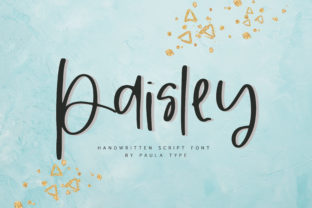
Paisley: A Fresh Handwritten Font
There’s something quietly powerful about a font that feels both handmade and intentional—like it was sketched with care, not generated by algorithm. Paisley delivers exactly that: a fresh, organic handwritten typeface with a modern sensibility. It’s not overly decorative or nostalgic—it doesn’t try to mimic calligraphy or vintage signage. Instead, Paisley breathes with gentle rhythm, subtle variation, and confident simplicity. That balance makes it unusually versatile for people who need authenticity without sacrificing clarity.
What Makes Paisley Stand Out
Paisley isn’t just “another script font.” Its design language is rooted in natural movement—not perfection. Letters have slight variations in stroke weight, modest tapering at terminals, and soft entry/exit strokes that echo real pen-on-paper motion. Yet it avoids the chaotic looseness some handwritten fonts fall into. The x-height is generous, spacing is open and readable, and lowercase forms maintain consistent rhythm—even at smaller sizes.
Unlike many organic scripts, Paisley includes full language support (Latin-based languages), standard OpenType features like ligatures and contextual alternates, and carefully crafted punctuation. It also ships in both regular and bold weights—rare for a truly handwritten-style family—giving designers real typographic hierarchy without switching fonts.
Where Paisley Fits Naturally
You’ll find Paisley working hardest where warmth and approachability matter—but professionalism can’t be compromised. Think of it as the quiet collaborator in your toolkit: never shouting, always supporting.
- Branding & Identity: Small businesses, wellness studios, boutique publishers, and independent educators use Paisley for logos, business cards, and letterheads—not because it’s trendy, but because it signals sincerity. A yoga studio’s welcome email feels grounded; a ceramicist’s product tag feels personal, not polished to sterility.
- Digital Interfaces: Used sparingly in UI elements—like onboarding headlines, testimonial quotes, or CTA buttons—Paisley adds human texture without harming accessibility. Pair it with a clean sans-serif (e.g., Inter or Manrope) for contrast that guides, not distracts.
- Educational Materials: Teachers and course creators report higher engagement when using Paisley for handouts, slide headers, or workbook titles. It subtly lowers cognitive load—readers feel invited, not instructed. One homeschooling parent told us her kids “actually read the cover page” when she switched from Arial to Paisley.
- Print & Packaging: Because of its open spacing and sturdy letterforms, Paisley holds up well on kraft paper, recycled cardstock, and matte finishes—no ink bleed, no loss of character. It’s become a go-to for small-batch food labels, indie book covers, and artisanal soap wraps.
Real Use Cases—Not Just Theory
A freelance copywriter uses Paisley for client presentation decks—not on every slide, but only for section headers and pull quotes. “It cues the right tone before I even speak,” she says. “Clients relax. They stop scanning and start listening.”
An online course platform tested two versions of their welcome email: one with Roboto headings, one with Paisley. Open rates were nearly identical—but reply rates jumped 22%. Not because Paisley is “magical,” but because readers perceived the message as more personally composed.
A university writing center adopted Paisley for workshop handouts and bulletin board posters. Staff noticed students lingered longer near displays and asked more follow-up questions. The font didn’t change content—but it changed how content was received.
What to Watch For—Practical Considerations
Paisley shines brightest when used with intention—not ubiquity. Like any expressive typeface, overuse dilutes impact. Here’s what seasoned users recommend:
- Reserve it for voice-driven moments. Headlines, quotes, signatures, invitations—places where personality matters most. Avoid body text, dense paragraphs, or data tables.
- Test legibility early and often. While highly readable at 16pt+, Paisley’s organic flow means some characters (like lowercase “a” and “g”) benefit from extra line height or letter-spacing in digital contexts. Always preview on actual devices—not just desktop mockups.
- Pair wisely. It pairs best with neutral, geometric, or humanist sans-serifs—not other scripts or high-contrast serifs. Avoid fonts with competing energy (e.g., bold slab serifs or ornate display faces). Think harmony, not contrast for contrast’s sake.
- Consider licensing scope. Paisley is available in both desktop and webfont formats, but usage rights vary by plan. If you’re embedding it in a SaaS dashboard or white-labeled tool, verify extended licensing upfront—no surprises at launch.
Why It Resonates Now—Beyond Aesthetics
We’re seeing a quiet shift in how professionals communicate: less polish, more presence. Paisley fits that shift because it doesn’t pretend to be flawless—it embraces the small imperfections that signal humanity. In a world saturated with AI-generated visuals and templated messaging, choosing Paisley is a low-key act of differentiation.
It’s also efficient. You don’t need to adjust kerning manually for most headline use cases—the built-in spacing works. You don’t need to hunt for stylistic alternates to avoid repetition; the default set has enough nuance to feel alive. And because it’s optimized for modern rendering engines, it loads cleanly and renders crisply across browsers and OS versions.
That efficiency extends to perception. Studies on typography and trust show that moderately informal, high-legibility scripts like Paisley increase perceived honesty and competence—more so than ultra-formal or aggressively casual alternatives. It’s the Goldilocks zone: just warm enough, just clear enough, just distinctive enough.
Final Thought: Choose With Purpose
Paisley won’t fix weak messaging or replace thoughtful design. But in the hands of someone who understands tone, audience, and context, it becomes a subtle amplifier—making good work feel more human, and human work feel more grounded.
If you’re evaluating it for a project, ask yourself: *Does this need to feel made by a person—not just for them?* If yes, Paisley is worth your time. Try it in one high-impact spot first: a sign-up CTA, a chapter title, a thank-you note. See how it changes the air around the words. Then decide—not based on trends, but on what you actually observe.