Bandem: A Bold Handwritten Font That Commands Attention—Used Right
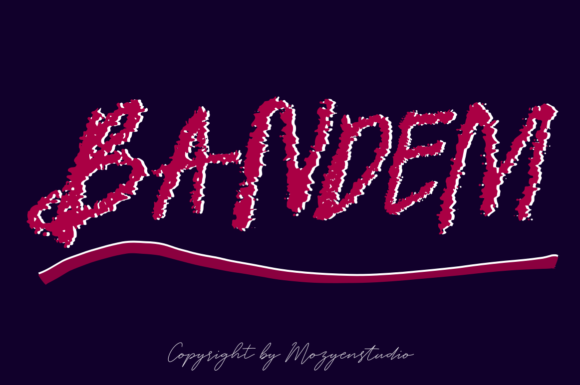
If you’ve ever scrolled past a social media post, landing page, or packaging design and thought, “That font just *pops*,” there’s a good chance Bandem was behind it. Bandem is a bold, dynamic handwritten font—not the kind that mimics casual scribbles, but one with deliberate energy, confident strokes, and rhythmic contrast. It doesn’t whisper; it leans in and speaks clearly. That’s why designers, marketers, educators, and small business owners reach for Bandem when they need authenticity with impact—whether for a podcast logo, an artisanal product label, or a workshop flyer.
Assuming Bandem Works Everywhere (It Doesn’t)
One of the most common oversights? Using Bandem for body text—or worse, long paragraphs. Its expressive letterforms, generous spacing, and intentional irregularity make it brilliant for headlines, quotes, and short callouts—but hard to read at small sizes or in dense blocks. Try setting a 300-word blog intro in Bandem at 16px, and readability drops sharply. Readers won’t linger—they’ll scroll past.
A better approach: Reserve Bandem for what it does best—emphasis. Pair it with a clean, highly legible sans-serif (like Inter, Lato, or even system fonts like -apple-system) for supporting text. In practice, that means your Instagram story headline in Bandem, caption in Montserrat; your coffee bag front label in Bandem, ingredient list in Open Sans.
Overlooking Licensing Before Downloading or Buying
Bandem isn’t always free—and even when it appears on free-font sites, the license may restrict commercial use, web embedding, or resale in templates. Some users grab Bandem from unofficial sources, assume it’s “just a font,” and drop it into client branding work—only to face legal risk or platform takedowns later.
Before downloading or purchasing Bandem, check two things: First, who’s the official source? The original designer or foundry (often listed on platforms like Creative Market or the designer’s own site) ensures you get the full family, updates, and proper licensing. Second, read the license terms—not just the headline (“free for personal use”) but the fine print on web fonts, app integration, and redistribution limits. For freelancers and agencies, a standard desktop license won’t cover client websites unless you’ve added web font hosting or purchased an extended license.
Ignoring How Bandem Performs Across Devices and Platforms
Handwritten fonts like Bandem rely heavily on hinting, OpenType features, and rendering engines—and not all platforms treat them equally. On Windows Chrome, Bandem might appear crisp and lively; on older iOS versions or certain email clients, letters can look cramped, uneven, or even substitute with fallback fonts without warning.
Test early and often: Preview Bandem in your final environment—not just in Figma or Photoshop. If you’re using it in a Shopify store banner, view it on iPhone Safari and Android Chrome. If it’s for a Canva template sold to educators, check how it renders in Canva’s mobile app. When in doubt, export key text as SVG instead of relying solely on live web fonts for critical headlines—especially where consistency matters more than editability.
Misjudging Weight and Contrast in Layouts
Bandem has presence—but presence isn’t automatic harmony. Its boldness can overwhelm lighter elements if not balanced intentionally. Dropping Bandem next to thin-line icons, delicate photography, or minimalist layouts often creates visual tension instead of cohesion. It’s not that Bandem is “too much”—it’s that its energy needs anchoring.
Try this instead: Use Bandem’s natural rhythm to guide hierarchy. Let its tall ascenders and deep descenders create vertical flow, then reinforce that with generous line height (1.4–1.6), ample margins, and intentional whitespace—not cluttered supporting graphics. One real-world example: A yoga studio used Bandem for their class title (“Restore & Rise”), then paired it with soft, full-bleed nature photos and a single neutral accent color. The result felt grounded, not chaotic—because Bandem wasn’t competing; it was leading.
Skipping Kerning Adjustments for Critical Text
Bandem includes thoughtful default kerning, but automated spacing rarely fits every word. Letters like “A”, “V”, “T”, and “W” often sit too tightly or loosely next to each other in custom phrases—“Bandem Logo” might look unbalanced without manual tweaking; “Save 50%” could read as “Save50%” if tracking isn’t adjusted.
Most design tools let you adjust kerning per pair (not just globally). In Figma or Illustrator, highlight two adjacent letters and nudge the value in small increments (±5–20 units). Even subtle shifts—tightening “AV” or loosening “To”—make Bandem feel more intentional and professional. Don’t skip this step before finalizing logos, social banners, or merch designs.
Underestimating File Size and Load Impact
Bandem’s rich outlines and stylistic alternates add character—but also weight. A full-bandem-webfont file (WOFF2) can range from 80KB to over 200KB depending on included glyphs and features. Slapping it onto a speed-critical homepage without optimization risks slower load times, especially on mobile or low-bandwidth connections.
Solution: Subset the font. Tools like Google Webfonts Helper or command-line utilities like pyftsubset let you keep only the characters you actually need—e.g., Latin uppercase/lowercase, numerals, and common punctuation. For an English-only e-commerce banner, that often cuts file size by 40–60%. Bonus: You’ll also reduce render-blocking time and improve Core Web Vitals scores.
Final Check Before You Commit
Before buying, downloading, or deploying Bandem, ask yourself:
- What’s the primary use case? Headline? Logo? Social graphic? If it’s anything longer than ~8 words or smaller than 24px, reconsider pairing or alternatives.
- Where will it render? Desktop web? Mobile app? Print brochure? Test in context—not just in isolation.
- Do I have the right license for my use—and my client’s? When in doubt, contact the seller or designer directly.
- Have I adjusted kerning and spacing for my exact wording? Never assume defaults are perfect for your phrase.
- Is the file optimized—not just installed? Subsetting, format choice (WOFF2 > WOFF), and delivery method matter.
Bandem isn’t just another handwritten font. It’s a tool with personality, purpose, and practical boundaries. Used thoughtfully—with attention to context, licensing, performance, and craft—it elevates clarity and connection. Used hastily, it adds friction instead of flair. The difference isn’t in the font itself—it’s in how deliberately you invite it into your work.