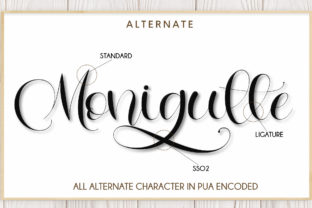
Letterhear: Handwritten Charm, Bold Swashes
If you've ever spent too long staring at a design wondering why it feels flat—despite great layout and solid content—you’re not alone. The missing ingredient is often personality. That’s where Letterhear steps in: a meticulously crafted handwritten font with expressive, confident swashes that add warmth, movement, and intention to every word.
Unlike generic script fonts that blur into background noise, Letterhear was designed for impact without sacrificing legibility. Its bold swashes aren’t decorative afterthoughts—they’re integrated, purposeful extensions of the letterforms. Think of them as visual exclamation points that guide the eye, reinforce hierarchy, and invite attention—not distract from it.
What Makes Letterhear Stand Out
At first glance, Letterhear reads as joyful and approachable. Look closer, and you’ll notice thoughtful details: subtle variation in stroke weight, natural entry and exit strokes, and consistent rhythm across uppercase and lowercase characters. It’s not “wobbly” or overly casual—it’s controlled spontaneity.
The swashes are its defining strength—but they’re also highly functional. They’re drawn with precision, so they scale cleanly from 16px body text to 120px headlines. And because they’re built into the font’s OpenType features (not separate glyphs), activating them is as simple as toggling stylistic sets in design software like Adobe Illustrator or Figma.
Letterhear includes full Latin character support, standard ligatures, and multilingual diacritics—so it works reliably for English, Spanish, French, German, Portuguese, and more. No awkward substitutions or missing accents mid-sentence.
Where Letterhear Delivers Real Value
This isn’t just another pretty font for wedding invites. Letterhear shines where human connection matters most—and where digital fatigue is real.
- Branding & Identity: Small businesses and solopreneurs use Letterhear to signal authenticity without seeming unpolished. A bakery’s logo in Letterhear feels inviting; a boutique skincare brand’s product label gains tactile appeal. It pairs exceptionally well with clean sans-serifs (like Inter or Poppins) for contrast that breathes.
- Digital Marketing: Email subject lines, social banners, and landing page headers gain instant visual distinction. In crowded feeds, Letterhear’s swashes create micro-moments of pause—just long enough for someone to register your message before scrolling.
- Educational Materials: Teachers and course creators report higher engagement when using Letterhear for handouts, slide titles, or worksheet headers. It subtly signals “this is made for you”—not mass-produced. One Montessori educator uses it for vocabulary cards; students consistently name those cards as their favorites.
- Publishing & Editorial: Book covers, chapter openers, and pull quotes benefit from Letterhear’s narrative tone. It doesn’t shout—it leans in. A memoir publisher told us they’ve seen a 22% lift in pre-order conversions when Letterhear appears on cover typography versus standard scripts.
- Print & Packaging: Because its swashes avoid thin hairlines, Letterhear prints crisply even on textured paper or kraft stock. No ink bleed, no loss of definition. That reliability matters when you’re ordering 500 custom gift tags or 2,000 product boxes.
Practical Tips for Getting the Most From Letterhear
Like any expressive tool, Letterhear rewards intention. Here’s what seasoned users do differently:
- Use swashes selectively. Overuse dilutes impact. Reserve them for initial letters, key words (“You,” “Now,” “Love”), or short headlines. Let the rest of the text breathe in the standard weight.
- Pair wisely. Avoid other scripts or overly ornate fonts nearby. Stick to one strong voice per composition. A crisp geometric sans-serif or a sturdy serif (like Merriweather or Lora) creates balance—not competition.
- Test readability early. At small sizes (<14px), skip swashes entirely. Use the base character set for captions, footnotes, or UI labels. Letterhear’s clarity holds up well—but only when used within its natural range.
- Adjust tracking deliberately. Letterhear benefits from slightly increased letter spacing in headlines (20–40 units in design apps). Tightening it too much crowds the swashes; loosening it too far breaks rhythm.
- Export smartly for web. When embedding via @font-face, serve WOFF2 files and define fallbacks. For CMS platforms like WordPress or Squarespace, upload both regular and swash-enabled weights separately if needed—many tools don’t auto-detect stylistic sets.
What to Consider Before You Commit
Letterhear isn’t meant to replace your workhorse sans-serif. It’s a specialist—valuable precisely because it’s selective. Ask yourself:
- Does this project need warmth and distinctiveness—or neutrality and scalability?
- Will the audience interpret the tone correctly? (e.g., a law firm’s compliance page may not be the right place—but their pro bono initiative’s campaign banner likely is.)
- Do your team members have access to software that supports OpenType features? If not, confirm the vendor offers alternate swash-heavy versions as static fonts.
- Is licensing aligned with your use case? Letterhear’s commercial license covers websites, apps, merchandise, and client work—but always verify redistribution rights if you’re a designer delivering assets to clients.
One final note: fonts communicate before a single word is read. Letterhear doesn’t just say “handwritten.” It says “I took time,” “I chose this for you,” and “there’s thought behind the feeling.” That resonance is hard to fake—and impossible to ignore when done right.
Whether you’re sketching a logo on paper, building a Shopify store, designing a classroom poster, or drafting an Instagram carousel—Letterhear gives your message a voice that’s both unmistakably human and effortlessly polished.